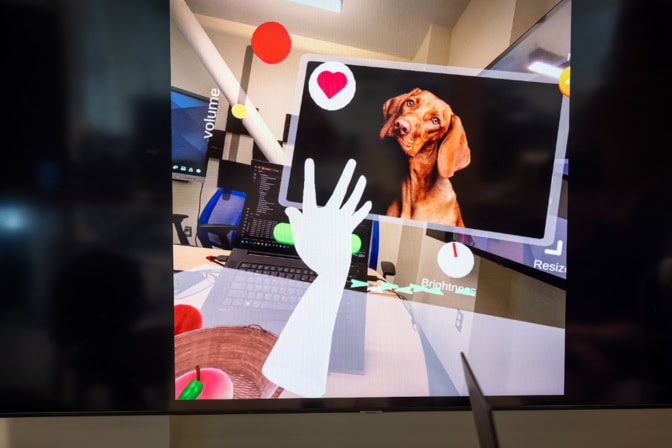
This digital hand enables hands-free virtual reality
More than just a stand-in, the AI-powered agent can complete tasks by following simple voice commands that don’t include nitty-gritty details.

More than just a stand-in, the AI-powered agent can complete tasks by following simple voice commands that don’t include nitty-gritty details.
Experts

Morris Wellman Faculty Development Assistant Professor of Computer Science and Engineering
A digital, voice-controlled hand could improve the convenience and accessibility of virtual and augmented reality by enabling hands-free use of games and apps. The prototype software was developed by computer scientists at the University of Michigan.
The researchers’ software, called HandProxy, allows VR and AR users to interact with digital spaces by commanding a disembodied hand. Users can ask the hand to grab and move virtual objects, drag and resize windows, and perform gestures, such as a thumbs up. It can even manage complex tasks, such as “clear the table,” without being told every in-between step, thanks to the interpretive power of GPT-4o, the AI model behind ChatGPT.
The hand’s ability to independently parse complex tasks on the fly makes it more flexible than current VR voice-command features, which are limited to simple, system-level tasks, such as opening and scrolling through menus, or predefined commands within an app or game.
On screen text:
HandProxy is an AI-powered digital hand that can be controlled by a user’s voice. It is designed for AR and VR platforms to allow users to navigate apps and interfaces hands free. Users can ask the hand to perform a variety of tasks. HandProxy lets the user know when it recognizes a task and when a task is active. As well as notifying users of error with their prompts. HandProxy offers an accessible form of control to users with motor impairments. The tool also gives users a way to interact with AR/VR platforms while performing other daily tasks.
Transcript:
Chen: Pick up the apple. Put it into the basket. Press the minimize button. Maximize the window.
Voice Off-Screen: Grab the peach. Pick up the watermelon. The first one.
Researcher: Press the minimize button. Maximize the window. Minimize the brightness. Wait—actually, maximize the brightness. Press the confirm button. Pinch the resize button. More… right… stop. Again.
This system is flexible for broader applications beyond just fruits, dogs, and buttons. What is it running on? I noticed the hand picked up the cube earlier, and when you told it to pick up the peach, it was smart enough to drop the cube first. How does that work?
Chen: The background—the “brain” of it—is powered by a large language model. It keeps a history of what the user has been doing and what the environment is like. The model dynamically infers what to do next.
For example, if I already have something in my hand and want to grab something else, it knows to drop the first item first. The system also remembers context. If I say “click the confirm button,” and later say “click it three times,” it understands I mean to click the confirm button three times.
In short, it’s aware of the user’s past interactions and the current environment.
Researcher: What do you see as the range of applications for this? I can imagine a lot.
Chen: Right now, we’ve built this environment, but imagine if a company like Apple integrated this functionality. You could use the virtual hand as a proxy to interact with other apps or games.
For instance, if I’m cooking and my hands are occupied, I could delegate control of the virtual hand to the system and give it voice commands. When I’m done, I can take control back.
This proxy design doesn’t require major changes to existing apps—since from their perspective, they’re still just interacting with a virtual hand. That means it’s compatible with a wide range of existing applications.
Researcher: Beyond cooking, where else could this be used?
Chen: There are two main use cases.
First, when hands aren’t available—either because they’re busy or due to physical constraints or impairments. The user can still interact with the system through speech.
Second, it can act as an intelligent agent to automate tasks. Instead of performing a long sequence of gestures, you can give a high-level command and let the system handle the details.
For example, in AR glasses for productivity, if you have multiple windows open, you could just say “organize my workspace,” and it would automatically rearrange them. Or in a game, you could say “clean the table,” and it would move the objects accordingly.
That’s faster and easier than issuing every action step-by-step.
Researcher: How does this compare to current VR voice commands?
Chen: Current speech controls are very limited to system-level tasks like increasing volume or selecting buttons. They can’t interact with unique app interfaces because those don’t support direct voice input.
Our system uses the virtual hand as a proxy, bridging that gap—so you can use speech to control all sorts of apps through the hand.
Current voice systems are also rigid; they require exact phrases. For example, you have to say “turn the volume up,” exactly as written. In our system, you can say “pick up the cube,” “grab the cube,” or “give me the cube”—and it still understands. It can infer what you mean.
Researcher: Could this technology control a physical robot arm?
Chen: Yes, there’s overlap. Robot control usually needs more precise physical interaction than VR—for example, friction and grip. But the inference side—the understanding of what to do—is similar. With further development, it could definitely be used in robotic control.
Researcher: Could you show a command that involves multiple inferred steps, like “clean the table”?
Chen: In this environment it’s simpler, but for example, when I say “increase brightness,” the system knows to grab the knob, twist it to the right, stop at maximum, and release. That’s already a multi-step inferred action.
Or if I say “maximize the window,” even without a label, it knows which button to press based on recent actions—like if I previously minimized the window.
Researcher: Got it. Could we see the headset demo?
Chen: Sure. Let’s get that set up.
Voice Off-Screen: Before we start, can you state your name?
Chen: My name is Chen Liang. I’m a fifth-year Computer Science Ph.D. student.
Researcher: Great. What’s your personal motivation—hands-free convenience, or accessibility?
Chen: Both. Accessibility covers a wide range—from long-term impairments to temporary limitations, or even personal preference. This project explores how speech control can become more capable and flexible, so when users can’t or don’t want to use their hands, there’s a viable alternative. Current interfaces don’t provide that, so we’re building on top of them to make it possible.
“Mobile devices have supported assistive technologies that enable alternative input modes and automated user-interface control, including AI-powered task assistants like Siri. But such capabilities are largely absent in VR and AR hand interactions,” said Anhong Guo, the Morris Wellman Faculty Development Assistant Professor of Computer Science and Engineering.
“HandProxy is our attempt to enable users to fluidly transition between multiple modes of interaction in virtual and augmented reality, including controllers, hand gestures, and speech,” said Guo, who is also the corresponding author of a study describing the software, published in Proceedings of the ACM on Interactive, Mobile, Wearable and Ubiquitous Technologies.
Enthusiasts praise VR for its immersion. Users want to be inside a virtual space, not just viewing it from the outside. The benefits, they claim, range from making games more exciting to training doctors and surgeons without risking lives.

Explore the forefront of AI
at Michigan Engineering
Maximizing physical realism is key for suspending disbelief, so the industry has moved toward tactile control with hand-tracking cameras and gloves. But the focus on life-like hand motions isn’t the ideal method for certain people and situations. VR users in cramped spaces might not have room for complicated gestures, and AR users may want to navigate small displays while their hands are full with cooking or cleaning.
A strict reliance on hand gestures becomes even more cumbersome for users who have motor impairments or other disabilities. People with muscular dystrophy and cerebral palsy have difficulty using VR, Scientific American reports. Tactile motions can even dissuade some users with chronic illness from even trying VR. One Redditor shared that a chronic illness prevents them from enjoying games with repetitive swinging motions, and they were skeptical that VR would be right for them. HandProxy could help make VR more comfortable and approachable.
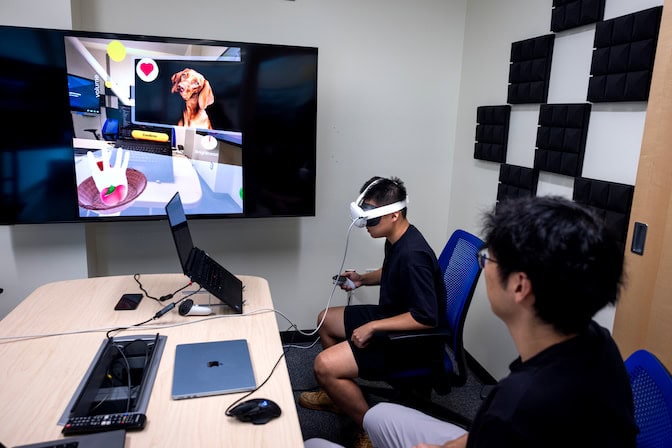
“If there is any built-in physics, which is true for most games and VR apps, HandProxy can interact with it,” said Chen Liang, U-M doctoral student in computer sciences and engineering and the first author of the study. “Our virtual hand gives the same digital signal as the user’s hand, so developers don’t have to deliberately add something into their programs just for our system.”
Some trial users are already enthusiastic by the tool’s potential. In the study, 20 participants were asked to replicate tasks from a demo video, then they freely explored HandProxy’s capabilities for 10 minutes. Some participants were excited to have a virtual stand-in that they could “talk (to) normally and intuitively.” But other participants, to the researchers’ surprise, were more excited by the idea of having the hand do more abstract tasks that “aren’t limited to the physical world.”
“It could act like an agent, where a user gives it a high-level command, like ‘organize my workspace,’ and it finds a way to sort and close all your open windows,” Liang said.
One barrier to adoption is that the hand sometimes misinterprets a user’s commands. HandProxy was asked to do 781 tasks during the study, and while it correctly performed most of the tasks within one to four attempts, it failed at 64. For instance, the software didn’t realize that one user was referring to a digital basket when they said “the brown object,” and it didn’t know to push a heart button when asked to “like the photo.”
The researchers are currently working on ways to help the software interpret ambiguous speech, without taking too many liberties. One study participant offered a potential solution: allowing the hand to ask and answer questions.
The team has applied for patent protection with the assistance of Innovation Partnerships and is seeking partners to bring the technology to market.
The research was funded by the University of Michigan.